POWCAPS
Scenery Koi Resin Keycap – Backspace/Spacebar – Cherry MX
Scenery Koi Resin Keycap – Backspace/Spacebar – Cherry MX
Couldn't load pickup availability
Bring some peace to your keyboard with the Scenery Koi Resin Keycap
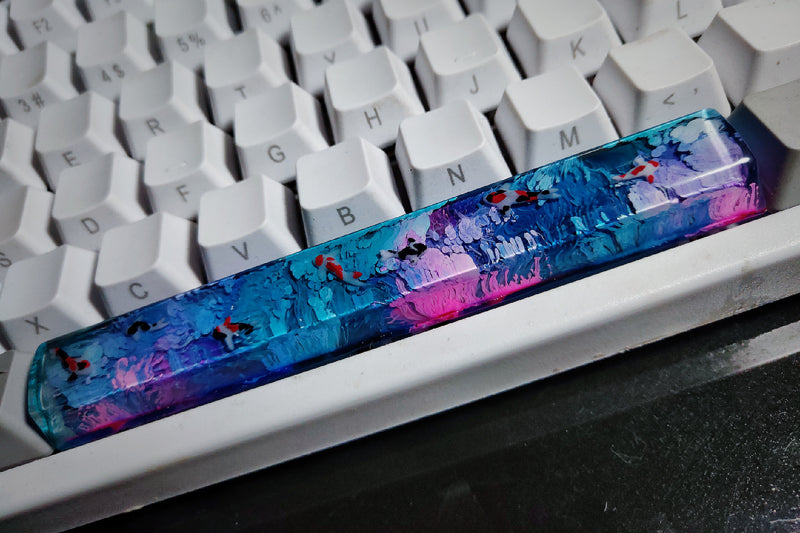
Give your setup a calm, stylish upgrade with the Scenery Koi Resin Keycap from Powcaps. A serene koi scene comes to life in the clear resin, giving your keyboard a unique, artisanal look. Every keystroke feels a little more special when you look at the miniature "pondscape" beneath your fingers.
Key Features
- Handmade resin keycap with detailed koi scene
- Compatible with Cherry MX switches
- Variants/Size Options: Spacebar, Smallkey2 (2u), Small (1u), and Backspace
- Material: Resin
- Package contents: 1x resin keycap
Will this fit my keyboard?
This keycap is designed for Cherry MX switches. Check beforehand which key and size you need. Backspace is often 2u, while Spacebar sizes can vary from keyboard to keyboard. Not sure? Consult your keyboard's specifications or measure your current keycap.
How to place your keycap
- Carefully remove the existing keycap with a keycap puller.
- Align the cross-shaped connector of the Scenery Koi keycap with the switch.
- Press straight and evenly until it clicks firmly into place.
Maintenance and tips
- Clean with a soft, dry microfiber cloth.
- Avoid harsh cleaning agents and alcohol.
- Store out of direct sunlight and extreme heat to maintain shine and clarity.
Why choose Powcaps?
- Unique, characterful artisan keycaps that will set your setup apart
- Carefully packaged and finished with attention to detail
- Accessible service and honest advice
FAQ
Is this keycap compatible with my switch?
Yes, the Scenery Koi Resin Keycap is compatible with Cherry MX switches.
Which size should I choose?
Choose based on the key you want to replace: Backspace is typically 2h, Small/Smallkey2 are the smaller keys (1h/2h), and Spacebar varies by keyboard. Check the layout or measure your current keycap to make the right choice.
Does the keycap come with the keyboard or switch?
No, the package contains one resin keycap. The keyboard and switches are not included.
Are all keycaps exactly the same?
Because each resin keycap is finished by hand, subtle variations in pattern and color may occur. This makes yours unique.
How do I prevent damage during installation?
Use a keycap puller, pull straight up, and press the new keycap straight down. Avoid prying to protect the switch stem.
Ready to make your setup shine? Add the Scenery Koi Resin Keycap to your cart and experience the tranquility of a miniature koi pond on your keyboard.
Share