POWCAPS
Powcaps Heated Mouse Pad & Desk Mat JR-CY335 (35–60°C) with Timer and USB Ports
Powcaps Heated Mouse Pad & Desk Mat JR-CY335 (35–60°C) with Timer and USB Ports
Couldn't load pickup availability
Warm hands, better focus – every workday
Never have cold hands at your desk again. The Powcaps JR-CY335 heated mouse pad & desk mat keeps your workspace comfortable with adjustable temperature from 35–60°C. Thanks to the clear temperature display, automatic shut-off after 3 hours, and ergonomic wrist rest, you can work longer without worry – at home, in the office, or while gaming.
Key Benefits
- Adjustable heat: 35–60°C with clear temperature display
- Safe and worry-free: 3-hour automatic shut-off (timing function)
- Comfortable operation: ergonomic wrist rest for a natural hand position
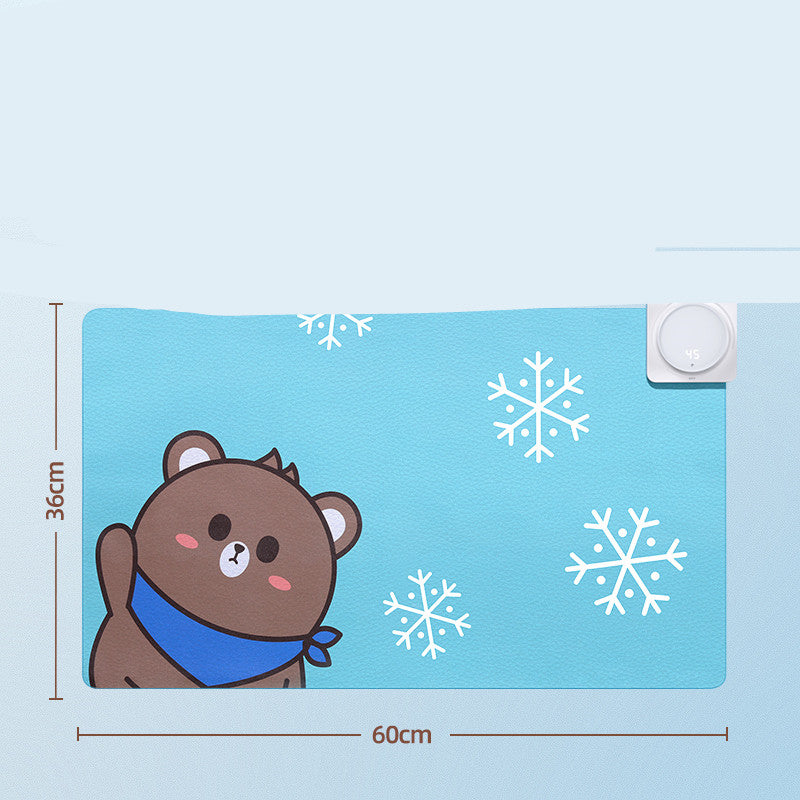
- Choose your size: 60×36 cm (65W) or 80×32 cm (75W)
- Convenient connections: USB outputs up to 5V/2A (max.) for charging accessories
- Stylish designs: Poss Bear (blue) or Hualien Bear (brown)
- Reliable power supply: 220V/50Hz for fast and even heating
Why choose the JR-CY335?
Smart temperature control
Adjust the heat precisely to your preference. The mat heats up quickly and maintains the selected temperature, so your hands stay comfortable – even in a cool room.
Sizes & colors that suit your desk
Choose 60x36 cm (65W) for compact desks or 80x32 cm (75W) for extra workspace. Add a playful touch with Poss Bear (blue) or Hualien Bear (brown).
Safe and energy efficient
The automatic shut-off after 3 hours prevents unnecessary consumption. The 220V power supply ensures constant heat, while the USB ports (5V/2A max.) are ideal for charging small devices.
Easy to install
Place the mat on your desk, plug it in, select your temperature, and you're ready to go. The integrated wrist rest supports a natural posture while working or gaming.
Specifications
- Product model: JR-CY335
- Product Name: Tabletop Heating Mat / Heated Mouse Pad & Desk Mat
- Power supply (input): 220V / 50Hz
- Power & size: 65W (60×36 cm), 75W (80×32 cm)
- USB outputs: 5V/2A (max.)
- Temperature control: 35–60°C, with temperature display
- Timer: automatic switch-off after 3 hours
- Colors: Poss Bear (blue) / Hualien Bear (brown)
What's in the box
- JR-CY335 heated mouse pad & desk mat
- Manual
- Data cable/power cable
FAQ
How do I connect the mat?
Plug the mat into a 220V/50Hz outlet, set the desired temperature, and let the mat preheat. You can use the USB ports (5V/2A max.) to charge accessories.
How hot does the mouse pad/desk mat get?
You can set the temperature between 35 and 60°C. The current temperature is displayed on the screen. Choose a setting that feels comfortable for your hands.
Is the JR-CY335 safe to use?
Yes. The mat automatically shuts off after 3 hours and is designed for reliable, daily use. Use the mat on a dry, flat surface and keep liquids away.
How much power does the mat consume?
The 60x36 cm version consumes a maximum of 65W (≈0.065 kWh per hour), while the 80x32 cm version consumes 75W (≈0.075 kWh per hour). At an electricity price of €0.40/kWh, this equates to approximately 2.6–3.0 cents per hour.
Does the mat fit on my desk?
Choose 60x36 cm for compact setups or 80x32 cm for more mouse and keyboard space. Measure your desk beforehand to determine the best fit.
How do I clean the mat?
Turn off the mat and unplug it. Wipe the surface with a slightly damp, soft cloth. Do not submerge or use harsh cleaners.
Can I charge my phone via the USB ports?
Yes, the USB ports deliver up to 5V/2A (max.) and are suitable for charging small devices and accessories. Use suitable charging cables.
Ready to give your workplace a comfort boost? Order the Powcaps JR-CY335 today and enjoy warm hands and greater focus every day.
Share